
iPhone battery health: what % is good, and when to replace it (2026)
Battery health is the one number that tells you more about a used iPhone than anything else on the listing — and it's the number most sellers don't print. This is what it measures, what's normal for a phone of a given age, what to accept when you're buying, and when a replacement is the smarter move.
What the number actually measures
iOS reports 'Maximum Capacity' — how much charge the battery can hold today compared with when it was new. A phone at 88% holds 88% of its original capacity, so it lasts about 88% as long between charges as it did on day one. It is not a measure of how well the phone works; a phone at 80% runs exactly as fast as one at 100%. It only affects how long it runs.
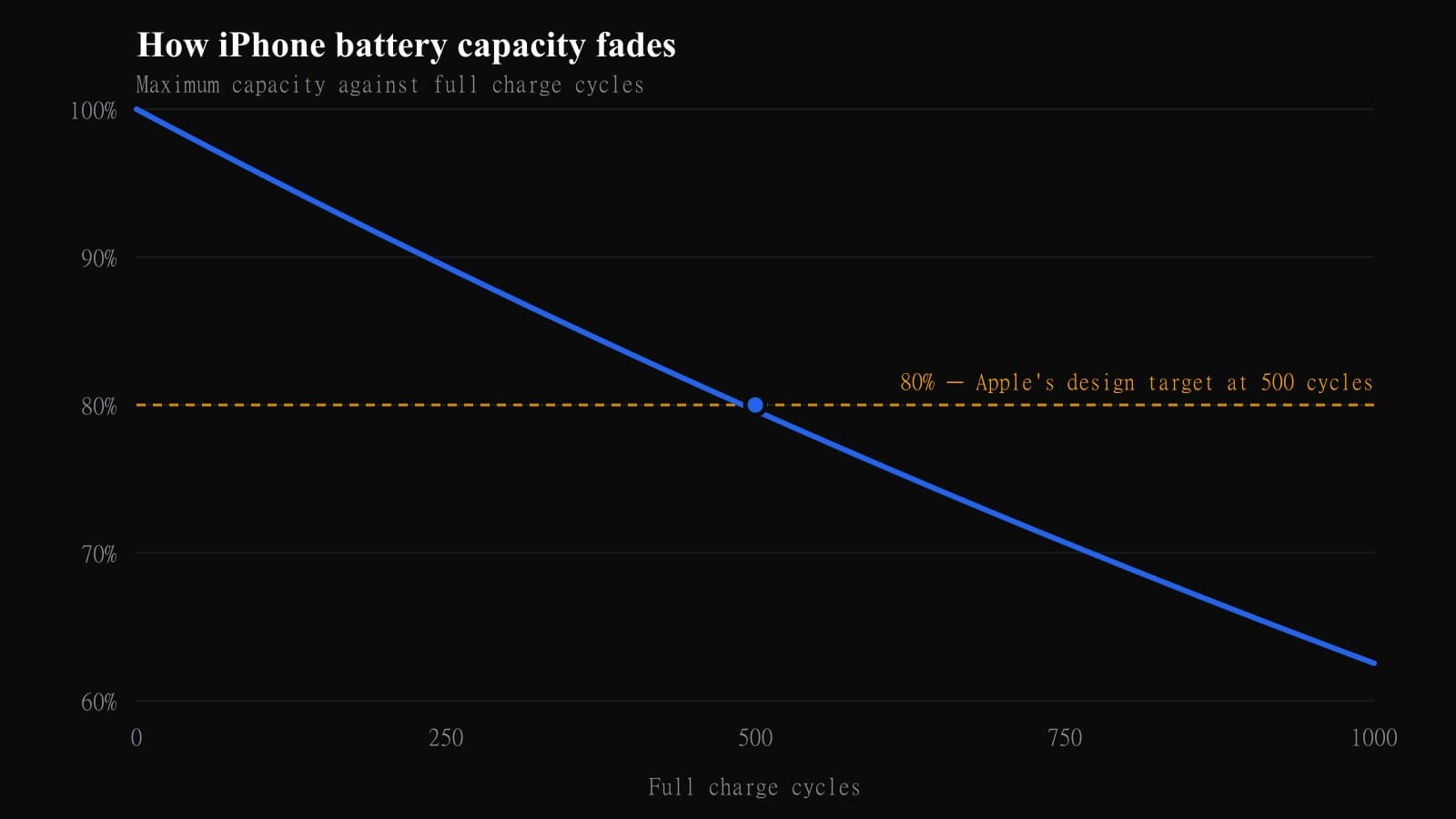
Underneath, every lithium battery wears with charge cycles. A cycle is one full 0–100% worth of charge, however you split it: two 50% top-ups count as one cycle. Apple rates pre-iPhone 15 batteries to keep 80% after about 500 cycles, and the iPhone 15 and later to keep 80% after about 1,000 cycles — the newer chemistry roughly doubled the useful life.
How to check it in 30 seconds
Settings → Battery → Battery Health & Charging. 'Maximum Capacity' is the number. On the iPhone 15 and later, Settings → General → About also shows the cycle count, which is the more honest figure — a phone at 90% with 150 cycles has aged gently; one at 90% with 600 cycles has been worked hard and will drop faster.
If the screen says 'Service' or 'Important Battery Message', the battery has fallen below 80% or a previous repair used a non-genuine part. Either way, factor a replacement into the price.
- 1Open SettingsThen tap Battery.
- 2Tap Battery Health & ChargingOn an iPhone 8 or newer. Older phones do not report it.
- 3Read Maximum CapacityThat percentage is what the battery holds now against when it was new.
- 4Check Peak Performance CapabilityIf it mentions an unexpected shutdown, the phone has already been throttled once.
What's normal for the phone's age
Roughly, for a phone charged once a day: after one year expect 92–96%; after two, 85–91%; after three, 80–86%; after four, most phones are at or below 80%. Heavy chargers and hot cars push those numbers down; light users and people who keep the 80% charge limit on push them up. iPhone 15 and newer age about half as fast.
So a two-year-old iPhone 14 at 89% is exactly where it should be. A one-year-old iPhone 16 at 84% has had a hard life.
| Phone age | Typical capacity | What it means |
|---|---|---|
| Under 1 year | 95-100% | Normal. No action. |
| 1-2 years | 88-95% | Normal wear. |
| 2-3 years | 82-90% | Expect a shorter afternoon. |
| 3-4 years | 78-86% | A replacement is worth costing up. |
| 4 years + | Under 80% | Apple's design threshold. Replace it. |
What percentage to accept when buying used
90% and above: as good as it gets second-hand — years of normal use left. 85–89%: fine, the sweet spot for value; you'll notice nothing for a long while. 80–84%: buy at a discount and plan a battery replacement within a year. Below 80%: the phone will throttle under load and the day won't last; only buy if the price already reflects a £60 battery.
We list the battery health on every phone we sell and don't sell below our stated minimum, because it's the difference between a phone that feels new and one that feels tired.
Habits that genuinely slow the wear
Heat is the enemy, not charging habits. Don't charge in direct sun, under a pillow, or in a hot car; take a thick case off if the phone runs hot on a fast charger. Turn on Optimised Battery Charging (it's on by default) and, on the iPhone 15 or later, the 80% charge limit if you charge overnight and rarely need a full day. Overnight charging is fine — the myth that it 'overcharges' died with iOS 13. Cheap unbranded chargers are a bigger risk than any charging habit.
When a replacement beats a new phone
A battery replacement on an iPhone 11 to 15 costs £50–60 with us and takes under an hour — and it resets the phone to day-one endurance. If the only thing wrong is 'it doesn't last the day', that's a £60 fix, not a £600 upgrade. Replace the battery when health is under 80%, or under 85% if you're planning to keep the phone another two years. Upgrade when it's the phone that's the problem: iOS support ending, a camera you've outgrown, storage full.
Buying a phone with a tired battery on purpose can also be the cheapest route to a good phone: an 81% iPhone 13 at a discount plus a £60 battery is often a better deal than a 95% one at full price. Get the numbers on our repair page and the phones on the iPhone page.
Ready when you are
Fixed price in seconds · doorstep collection · live tracking
Get an instant repair quoteFrequently asked
Is 85% battery health good for a used iPhone?+
Yes — 85–89% is the value sweet spot. You'll get normal all-day use for a long time, and a replacement isn't needed for a year or more.
Is 80% battery health bad?+
It's Apple's own service threshold. At 80% the phone works fine but won't last a full day of heavy use, and iOS may throttle peak performance. Budget £50–60 for a replacement.
How much does an iPhone battery replacement cost in the UK?+
Apple charges £85–£119 depending on model (Apple UK out-of-warranty battery service, checked 6 October 2026). Independent repairers, including us, charge £50–60 for most models with a same-day turnaround and a warranty on the work.
Does battery health drop faster on Pro models?+
Not meaningfully. The Pro Max and Plus models have bigger batteries so they need fewer cycles for the same use, which means they tend to age a little slower in practice.
Can battery health go back up?+
No. It only decreases. A jump upward after an update is a recalibration of the estimate, not a recovered battery. Only a replacement resets it.
Should I keep my iPhone at 80% charge?+
If you charge overnight and don't need the full capacity most days, yes — the 80% limit on the iPhone 15 and later noticeably slows wear. If you need every hour, leave it off; the difference over two years is a few percent, not a new battery.